

Have you ever patted your pockets in a panic, wondering where your keys went? Or spent minutes searching for your wallet before heading out? That’s where the iSearching App comes in handy. This Bluetooth item finder app promises to help you keep track of your everyday essentials with minimal fuss. Developed by FINDN LTD (with ties to Shenzhen Lenze Technology Co., Ltd.), the iSearching App has been available since around 2015 on both Android and iOS platforms, amassing over 1 million downloads on Android alone. At its core, the iSearching App turns your smartphone into a locator by pairing it with inexpensive Bluetooth tags you can attach to keys, wallets, bags, or even pets. No subscriptions are required—just download the free iSearching App and buy affordable tags to get started. Let’s explore what the iSearching App offers, its performance in real-world use, and whether it’s the right choice for your needs.
Key Takeaways
- The iSearching App uses Bluetooth for tracking, with a typical range of 75-100 feet, but no true GPS or crowdsourced network for longer distances.
- Popular on Android with strong download numbers, yet the iSearching App carries low ratings—around 2.8/5 on Google Play from thousands of reviews.
- The iSearching App is great for budget-conscious users needing basic short-range finding; alternatives like Tile or Chipolo provide more reliability and extended features.
- Recent updates to the iSearching App have improved multi-language support, but connectivity problems and battery drain continue to frustrate many users.
- The free iSearching App pairs with low-cost tags, though some reviews raise questions about app permissions and developer support.
Key Features Explained
What sets iSearching apart in the crowded world of item locators? The standout is its two-way anti-loss alarm: if the tag moves out of Bluetooth range, both your phone and the tag sound an alert. Conversely, you can press a button on the tag to ring your phone—perfect for when it’s buried in the couch cushions.
Map positioning is another core tool, displaying the last known location where your phone was connected to the tag, leveraging your device’s location services. Remember, this is not real-time GPS tracking; it’s limited to Bluetooth range, so precision falls off sharply beyond 75-100 feet in open areas (less with obstacles like walls).
Family sharing allows multiple users to monitor the same tag, ideal for communal items like shared car keys. Updates in recent years, including multi-language additions (such as Russian), have broadened accessibility. Extras like using the tag as a remote camera shutter add versatility, making it a multifunctional tool beyond simple locating. These features position iSearching as a straightforward entry point into Bluetooth item finding.
Setup and Compatibility
Starting with iSearching is generally quick and user-friendly. Download the app from Google Play or the App Store (search for “iSearching” by FINDN LTD or associated developers to ensure authenticity). Enable Bluetooth and location services on your device first.
To pair a tag: Open the app, select add device, and press the tag’s button until it beeps—it usually connects within seconds on devices supporting Bluetooth 4.0 or later. Compatibility extends to modern versions like Android 15 and iOS 18, though older phones may require system updates. If pairing stalls, try restarting Bluetooth, ensuring proper permissions (location and Bluetooth access are essential), or rebooting your phone.
Pro tip: Name your tags clearly in the app (e.g., “House Keys” or “Dog Collar”) for easy identification when managing multiples. The entire process typically takes less than five minutes, getting you ready to eliminate those everyday search frustrations.
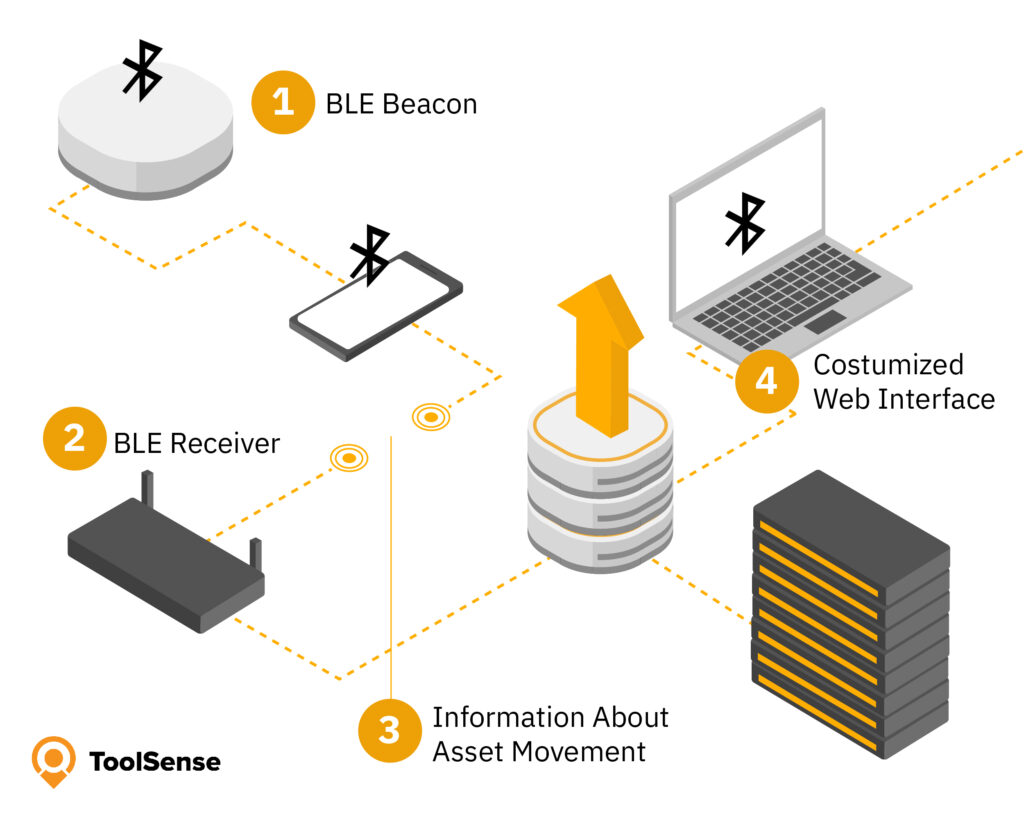
Here’s a simple diagram illustrating how Bluetooth item finder tags like those used with iSearching generally work:

Pros and Cons Analysis
iSearching has clear strengths and notable weaknesses. On the positive side, it’s highly budget-friendly—no recurring fees, and compatible tags often cost just $5-15 each, making it 70-80% cheaper upfront than competitors like a Tile Mate (typically $25) or Chipolo One (around $25-28). The interface is straightforward, requiring no advanced tech knowledge, and the bidirectional alarm performs reliably for in-home or close-proximity scenarios.
The drawbacks are more pronounced for many users. Frequent connectivity drops occur, even when tags are nearby, leading to unreliable alerts. Battery drain affects both phone (due to ongoing Bluetooth scanning) and tags (CR2032 coin batteries often lasting only 2-4 months with regular use, versus up to a year for many Tile or Chipolo models). Current Google Play ratings hover around 2.8/5 based on thousands of reviews (aggregated from sources like AppBrain and Play Store data as of late 2025).
Balancing these, iSearching excels as a low-commitment option for occasional, short-range needs. For more intensive or distant tracking, the limitations may prove too restrictive.
User Reviews and Sentiment
Real-user feedback on iSearching is decidedly mixed, trending toward skeptical in recent years. Positive comments frequently highlight its value for simple tasks—one reviewer called it a “lifesaver for forgetful types” after quickly locating keys in a bag via the alarm. Others appreciate the rock-bottom cost, noting it outperforms expectations for light, occasional use.
However, critical reviews dominate 2025 feedback. Common gripes include unpredictable disconnects (e.g., tags failing to reconnect after app closure) and rapid tag battery depletion. Privacy mentions arise occasionally, tied to required permissions like persistent location access. Aggregated across app stores and review sites, the consensus is that it’s functional for basics but inconsistent for dependable daily use—improvements in language support are noted, yet core stability issues persist.
Comparisons to Alternatives
In the Bluetooth tracker space, how does iSearching measure up? It shines in cross-platform compatibility, working seamlessly on both Android and iOS without ecosystem lock-in. Apple AirTag, by contrast, integrates deeply with iOS for precision finding via the massive Find My network but limits full functionality on Android—and boasts much higher ratings around 4.7/5.
Tile provides similar two-way alarms plus anonymous crowdsourced locating through its user network, offering greater range reliability (though premium features require subscription). Tile models often rate 4.5/5 or higher. Chipolo One emphasizes loud alarms and extended battery life (up to a year), with strong simplicity—tags priced around $25.
For budget searches like “iSearching vs Tile,” iSearching wins on initial affordability, while Tile or Chipolo prevail in durability and performance. The broader Bluetooth location services market continues steady expansion, reflecting growing demand for these convenient tools.
Troubleshooting Common Issues
Encountering glitches with iSearching? Many issues have straightforward fixes based on user reports and app guidance. For frequent disconnects: Restart Bluetooth on your phone, reopen the app, and check for signal interference (walls, other devices).
To address phone battery drain: Disable “alarm on disconnect” in settings if constant alerts aren’t needed—this reduces background activity while preserving core functions. For tags: Replace CR2032 batteries proactively every few months; heavy alarm use accelerates depletion.
Privacy-related hesitation? Limit permissions to essentials (Bluetooth and location only—no microphone required). A full app reinstall can resolve persistent bugs without data loss.
Here’s a helpful visual flowchart for common Bluetooth tracker connection troubleshooting (adaptable to iSearching scenarios):

Is iSearching Right for You?
Ultimately, iSearching suits specific scenarios best. If budget is paramount and you’re seeking a simple, no-frills way to locate items around the house or office, its low cost and ease make it worth testing—start with one inexpensive tag on your keys to gauge performance.
For extended range, pet monitoring, or critical valuables, its Bluetooth-only limitations (no crowdsourced help) make it less ideal. Privacy labels indicate no personal data collection, but the app requires always-on location access, and the privacy policy (hosted externally) remains somewhat vague on sharing or transfers, which may concern privacy-focused users. Developer support responses are inconsistent.
In essence, dip your toes into Bluetooth tracking with iSearching if you’re after an ultra-low-cost starter solution for low-stakes, nearby items. For greater reliability or peace of mind on important belongings, consider the more established alternatives discussed.
FAQs
How far does the iSearching app work?
The iSearching app relies on Bluetooth, so it typically works up to 75-100 feet in open spaces. Walls or interference can shorten this. It uses your phone’s last connected location for mapping, but without true GPS, it’s not great for tracking far-away items like lost luggage. For best results, stay in range and use the alarm feature promptly.
Is the iSearching app safe to use?
Privacy labels state no data collection, but the app requests persistent location access. Its policy is somewhat vague on potential sharing or international transfers, tied to its developer origins. Stick to official downloads, grant only necessary permissions, and monitor updates. Overall, it’s usable for basic tracking with standard precautions.
How to stop iSearching beeping?
To quiet the beeps, open the app and toggle off “alarm on disconnect” in settings—this stops alerts when you move out of range or close the app. If it’s beeping randomly, check battery levels on the tag and reconnect. For false alarms, adjust sensitivity if available, or mute your phone temporarily. These tweaks usually resolve it quickly.
Does iSearching support GPS tracking?
No, iSearching is strictly Bluetooth-based, not GPS. It shows approximate locations via your phone’s map, but only from the last connection point. This means no real-time tracking over long distances. If you need GPS for vehicles or pets, opt for hybrids like some Tile models. It’s fine for nearby items,s but limited otherwise.
What devices work with iSearching?
iSearching pairs with Bluetooth 4.0 or newer on Android and iOS devices. It supports tags for keys, wallets, and pets, but reviews show mixed success with moving items like animals due to range limits. Ensure your phone runs recent OS versions for compatibility. It’s cross-platform, unlike AirTag, making it versatile for mixed households.
How to fix the iSearching battery drain?
To curb drain, disable background scanning in app settings and only open it when needed. Update to the latest version for optimizations. On tags, use fresh CR2032 batteries and avoid constant alarms. Users note phones last longer with these changes, turning a common complaint into a manageable issue.
Final Thoughts
Dipping your toes into Bluetooth tracking? iSearching offers an accessible, low-cost entry point worth trying for casual, short-range needs—attach a tag to your keys and experience the convenience firsthand. Weigh your priorities carefully, though: if reliability for farther distances or critical items is essential, explore the more robust alternatives highlighted here. With mindful setup and realistic expectations, it can reduce those small daily stresses effectively.
